macOS · Local-first

Notes that work with
your workflow

WIP Notes: a clean three-panel writing app for macOS. Organize with Notebooks, write with rich formatting, and export to any format — all stored locally on your Mac.
macOS 14 Sonoma and later · No account, no credit card required

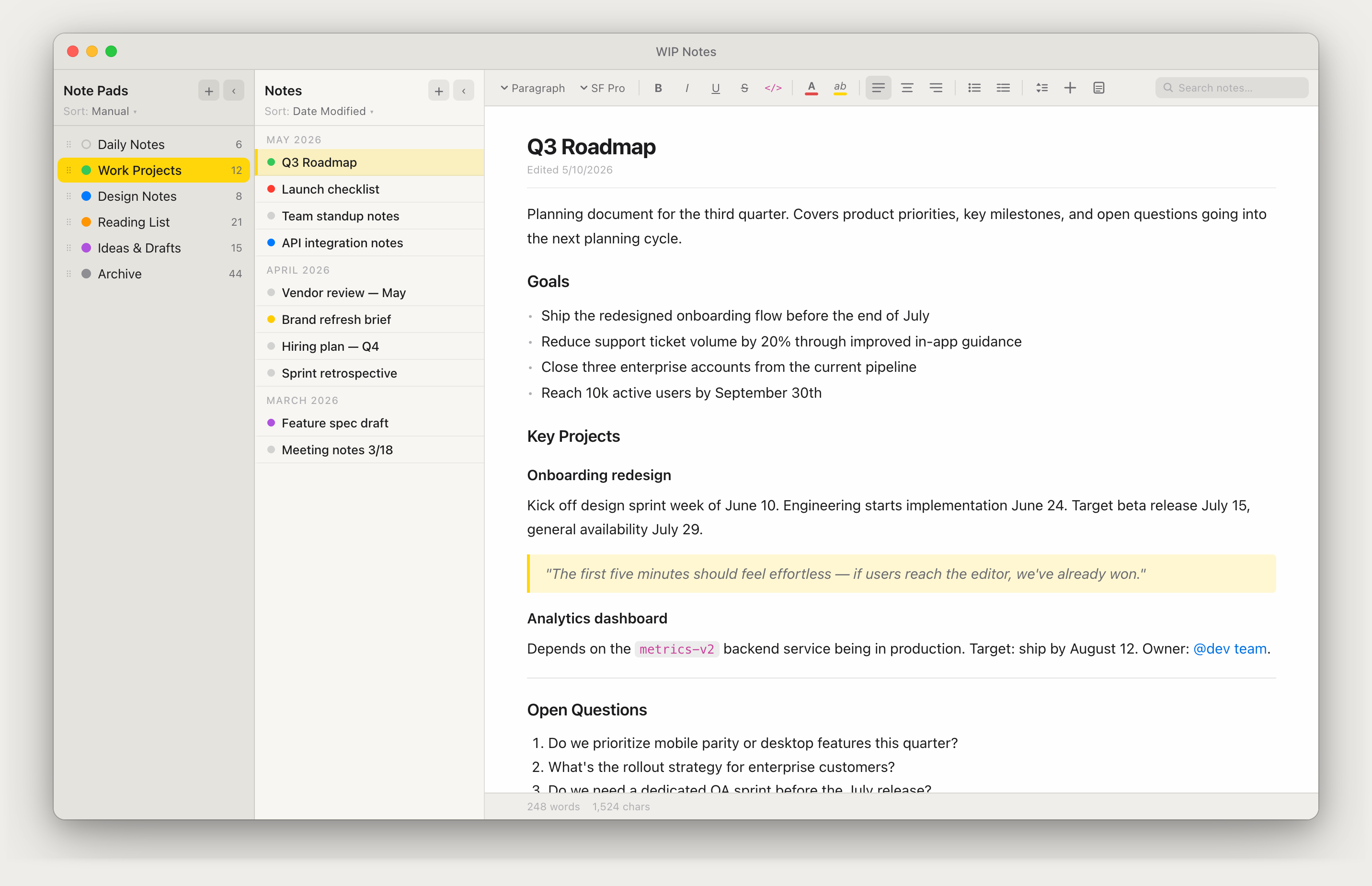
WIP Notes app — three-panel layout with Notebooks, notes list, and rich text editor
Local-only storage
No account required
No cloud sync
Native macOS app
No subscriptions

W·I·P — Work In Progress Built for the work you're in the middle of.

WIP stands for Work In Progress — a dedicated workspace for everything you're actively building: notes, ideas, images, and references organized by project, stored only on your Mac.

Most note apps are designed for information you want to keep forever. WIP Notes is different — it's built for the work you're actively doing.

Each project gets its own Notebook. Inside it: the notes you're taking, the ideas you're testing, the images you keep coming back to, the decisions you've logged, the research you need close at hand. Everything for that project, in one place, ready the moment you open the app. Notes inside a Notebook can be organized into Note Groups — named sections that keep related notes together so your workspace stays structured as projects grow.

It's not a journal. Not a knowledge base. Not a general inbox. It's the scratchpad, the draft, the running log — a dedicated workspace for every project you have in flight. When a project ships, export it and move on. Until then, WIP Notes is where that work lives.

Everything you need.
Nothing you don't.

WIP Notes is deliberately focused. A fast, clean writing environment with just the right tools.

Three-panel workspace

Notebooks on the left, notes in the middle, editor on the right. Collapse any panel to focus. Resize to your liking — widths are saved between sessions.

Rich text formatting

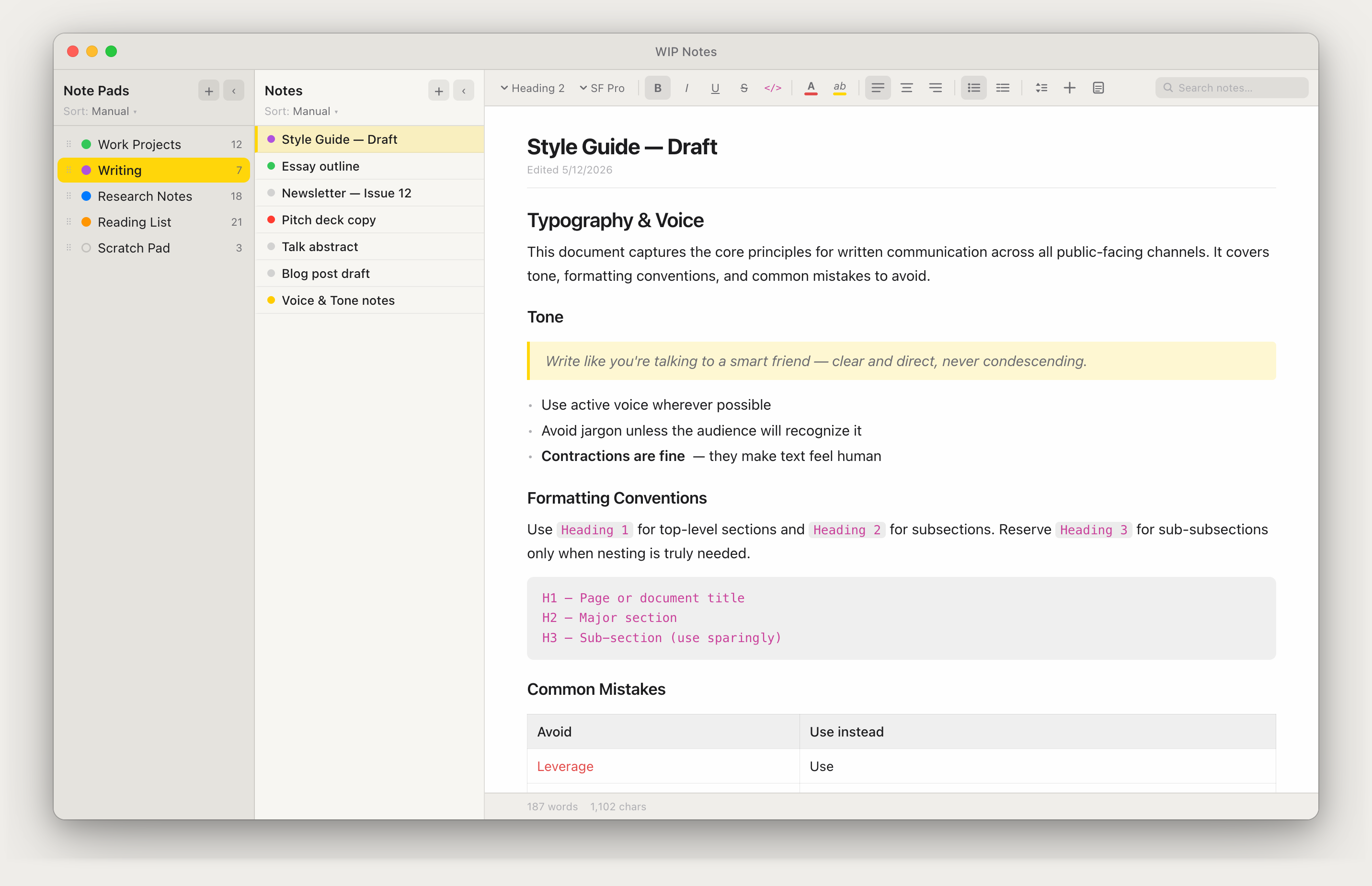
Headings, bold, italic, code blocks, blockquotes, bullet & numbered lists, checklists, inline code, text color, highlights, alignment, tables, and images.

Table editing

Paste from Excel and WIP Notes creates a fully editable table. Resize columns by dragging, select individual cells or ranges, and add or remove rows without leaving the editor.

Color labels

Tag Notebooks and individual notes with seven colors. Sort by label to instantly group by project, priority, or status across your entire library.

Import anything

Bring in plain text, Markdown, RTF, Word, HTML, PDF, Fountain, JSON, and YAML. Batch import an entire folder and it becomes a new Notebook automatically.

Export anywhere

Export individual notes, grouped notes by color label, or entire Notebooks. Output to PDF, Word, HTML, Markdown, RTF, plain text, or JSON.

Page Mode & Print

Toggle Page Mode for a paginated letter-size canvas with visible page boundaries. Insert page breaks, then print or export to a clean, properly-paginated PDF.

Checklists

Insert a task list with one click. Check items off as you go — completed items get a strikethrough and stay in place. Exports as standard [ ] / [x] task syntax.

Sort & organize

Seven sort modes per Notebook — manual drag, date modified, date created, A→Z, Z→A, and label ascending or descending. Group related notes into named Note Groups. Each Notebook remembers its own sort independently.

Built around how you actually work

Three resizable panels, each with their own sort order. Collapse what you don't need. Your layout is saved and restored every time you open the app.

  • Drag notes between Notebooks
  • 7 sort modes including date groups and label order
  • Restores your last open note per Notebook
  • Undo deleted notes and Notebooks any time during a session
  • Search across all notes with real-time highlights
Sort modes
Manual Date Modified Date Created A → Z Labels ↑
Color labels

Your notes, your format

WIP Notes opens and exports more file types than you'll probably ever need. Move your existing notes in, and get your writing out in exactly the format you want.

Import

.txt .rtf .md Rendered .md Raw .docx .xlsx .html .pdf .fountain .json .yaml Import from URL Batch folder import

Export

.txt .rtf .docx .html .pdf .md .fountain .json .yaml Single note By color group Entire Notebook
Batch Import — drop a whole folder in
Select any folder and WIP Notes imports every compatible file as individual notes, automatically creating a new Notebook named after the folder. Text, Markdown, Word, Excel, HTML, and RTF files are all supported.

Write without distractions

The editor saves automatically as you type — no Cmd+S required, ever. Switch notes freely; your work is always persisted. The status bar shows live word and character counts.

  • Up to 1,000 undo steps per note session
  • Inline code in monospace or full code blocks
  • Link inserter supports http, https, mailto, and rdar://
  • Paste screenshots directly from the clipboard
  • Float images left or right with text wrap
WIP Notes editor showing rich text formatting — headings, code blocks, blockquote, and a table

Color your way to clarity

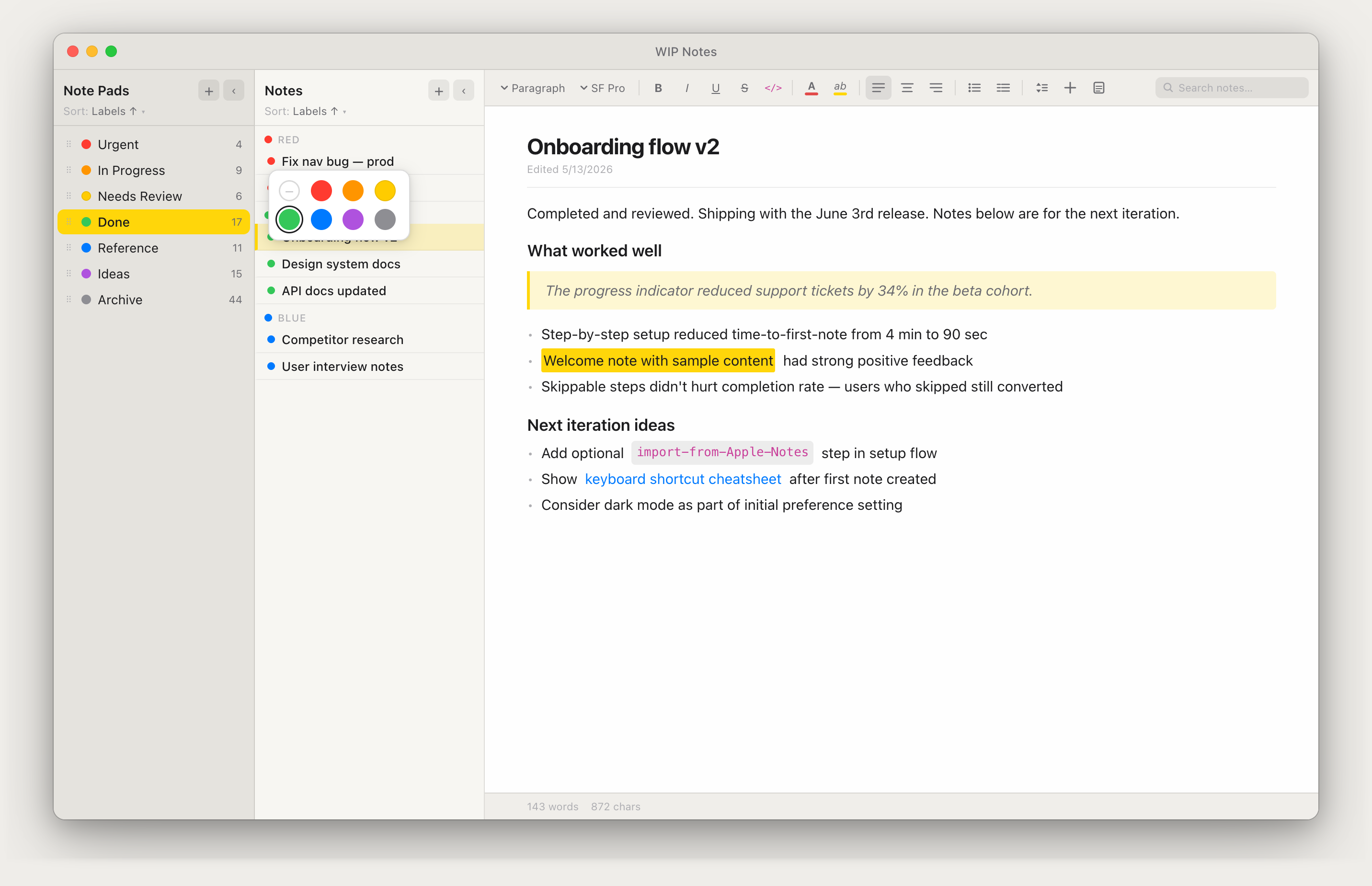
Seven label colors — Red, Orange, Yellow, Green, Blue, Purple, Gray — can be applied to any Notebook or individual note. They're the same seven colors everywhere, so your system works consistently. They also match the standard macOS Finder labels, so your color system carries across your entire project workflow.

  • Sort by Labels ↑ or ↓ to group by status
  • Export all notes sharing a color as a single document
  • Works across all Notebooks simultaneously
WIP Notes showing color labels across Notebooks and notes sorted by label, with the color picker open

Talk to your notes with AI

WIP Notes ships with an MCP server that connects your notes to the AI tools you already use — Claude Desktop, ChatGPT, and Gemini CLI. Ask questions, create notes, and reorganize your workspace without leaving your AI assistant.

Included free with WIP Notes
  • Ask Claude to summarize, search, or reorganize notes across any Notebook
  • Create and update notes from Claude — great for capturing research or drafts
  • Reads directly from your local database — no cloud relay, no middleman
  • Move notes in bulk by color label, title, or ID — one instruction, done
  • Import local HTML files directly — no hosting required
Claude
ChatGPT
Gemini
View setup guide
18 tools available to Claude
list_notebooks list_notes get_note search_notes create_note update_note delete_note create_notebook update_notebook delete_notebook list_note_groups create_note_group update_note_group delete_note_group move_note move_notes import_from_url import_from_file
Claude Desktop
Find my notes about the Henderson proposal and summarize what's still open
search_notes
3 results

Found 3 notes in Client Work:

Henderson Scope Draft
Timeline, deliverables, revised budget · 2 days ago
Henderson Call Notes
Stakeholder concerns, sign-off process · yesterday
Henderson Follow-up
Action items, next steps · today

Still open: timeline. They pushed back on the 6-week estimate — no resolution logged yet.

Local-first

Your notes never leave your Mac.

WIP Notes stores everything in a local SQLite database on your drive. If your drive is secure, your notes are secure — including sensitive or nondisclosed information you'd never trust to a cloud service. After your purchase and license validation, there is no sync service, no account creation, no background network requests, and no telemetry of any kind. Your notes are files you own — readable only by you, on your machine.

That architecture isn't a feature toggle or a privacy mode. It's the only mode. WIP Notes has no server to send data to.

Legal & Attorney Work

Attorney-client privilege depends on confidentiality. Keep client matter notes, case strategy, and privileged communications in an app that can't expose them — no cloud account to subpoena, no sync logs, no third-party servers.

Corporate & Executive

Sensitive, nondisclosed materials — unreleased product plans, M&A notes, board materials, and competitive intelligence — belong on your machine, not in a cloud service governed by someone else's terms. WIP Notes works on air-gapped networks and locked-down corporate environments with no setup.

Government & Defense

Sensitive environments and classified networks prohibit cloud-connected apps by policy. WIP Notes makes no outbound connections — it runs entirely offline, installs from a single .dmg, and requires no authentication, account, or internet access at any point.

No account requiredOpen the app and start writing
No network requestsZero outbound connections, ever
No telemetryUsage data stays on your machine
Air-gap compatibleRuns fully offline, no setup needed
No update checksWIP Notes never phones home — even for updates
Read the full security & privacy statement →

How WIP Notes stacks up

Every Mac notes app makes a different trade-off on price, privacy, and structure. Here's where WIP Notes fits — honestly, including where it doesn't win.

Antinote

$5 · once

The fastest scratchpad on the Mac — great for notes that don't need to last past today.

Compare →

Bear

$29.99/yr

A beautifully crafted markdown editor with real cross-device sync — if you actually need it.

Compare →

Apple Notes

Free · bundled

Already on your Mac and synced through iCloud — simple, but not built for structured project work.

Compare →

Evernote

up to $249.99/yr

The original cloud notebook — a 2025 plan overhaul pushed full-featured pricing close to $250 a year.

Compare →

Obsidian

Free · sync $4/mo

Local-first like WIP Notes, but built for linked knowledge graphs — not day-to-day project work.

Compare →

Don't see yours?

These are the ones we hear about most. If you're weighing WIP Notes against something else, email us — we'll give you a straight answer.

Ask us →

One price. Yours forever.

No subscription. No renewal. No seat fees. Pay once and WIP Notes is yours for life.

$27
one-time purchase
Price locked through 2026
  • Lifetime license — no expiration
  • All future updates included
  • MCP server for AI integration included
  • No account required — ever
Team & corporate licensing available. Volume pricing for teams, organizations, and enterprise environments.
Get in touch
Nonprofits & educational licensing available. Qualifying organizations can request a free license for classroom or organizational use.
Get in touch

Start writing.
It's already saved.

Try WIP Notes free for 30 days — no account, no credit card. Buy once and it's yours forever.

macOS 14 Sonoma or later · Apple Silicon and Intel · One-time purchase, no subscription